Opera's New Split-Screen Feature: A Game changer for Multitaskers
Have you ever found yourself struggling to manage multiple browser windows while trying to compare products,research,or keep a video playing? If so,you're not alone. Many users face this challenge when using popular browsers like Chrome or Safari. Thankfully, Opera has stepped up its game by enhancing its built-in split-screen feature, transforming it into a powerful multitasking tool that operates seamlessly within a single window.
Enhanced Multitasking with Up to Four Tabs
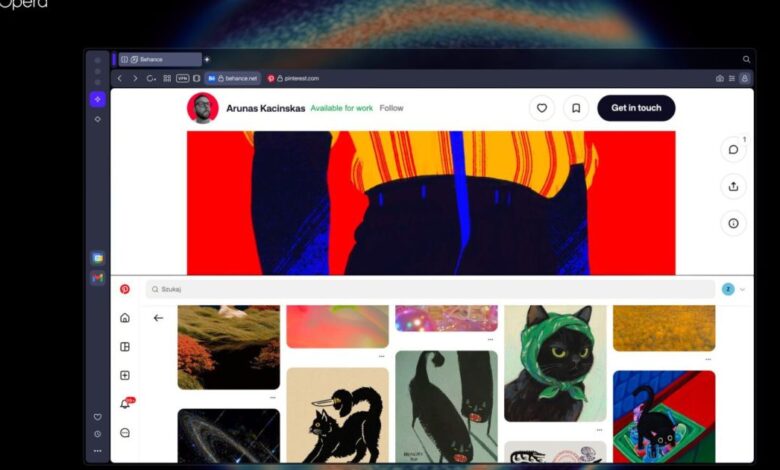
The latest update allows users to view and interact with up to four tabs together in Opera’s split-screen mode.This means you can easily drag tabs around or right-click them to set up your preferred layout—whether that’s side by side, stacked on top of each other, or arranged in a grid format.
This new functionality doesn’t just stop at tab management; it also integrates smoothly with Opera's sidebar tools like Gmail and Calendar. You can have your email open while browsing the web without feeling cramped for space.
The Benefits of an Organized Workspace
This innovation is significant because it enables users to access multiple webpages all within one Opera window. There’s no need for additional extensions or separate windows cluttering your desktop anymore.
One of the standout features is how neatly everything is organized. In split-screen mode, there’s only one address bar shared across all visible tabs. This keeps things tidy and ensures that essential functions like bookmarks and snapshots continue working flawlessly even when you're multitasking.
A clutter-Free Experience
moreover, the split-screen feature works harmoniously alongside Opera's modular sidebar tools. If you prefer having fast access to your email or calendar while browsing the web, this setup allows for easy integration without overwhelming your workspace.
Why This Matters for everyday Users
If you've ever felt overwhelmed juggling several browser windows just to verify information or make comparisons between products,you'll appreciate what Opera offers now more than ever.
The way we browse has changed substantially over time; however, many browsers still require us to open separate windows or rely on external applications for effective multitasking tasks. With Opera's integrated approach, it feels as if you're working in a multi-window environment but contained within one frame—a much more efficient way of handling various tasks at once!
A Flexible Layout Tailored To Your Needs
This adaptability means whether you're writing an article while referencing different sources online or comparing prices from various retailers—all these activities can be done simultaneously without losing focus on any single task!
Pushing Boundaries with AI Features
Additionally, it's worth noting that Opera has been actively exploring AI-driven browsing through its Neon browser project. While still in growth stages and not entirely perfect yet—it aims at simplifying tasks such as shopping online booking travel arrangements—this could further enhance user experience down the line!
Your Browsing Experience Just Got Better!
If you’re someone who frequently enough finds themselves switching between numerous tabs and windows during their online activities—be prepared! The new enhancements from Opera are designed specifically with you in mind! Enjoy smoother transitions between tasks without sacrificing organization along the way!
And don't forget! NoveByte might earn a little pocket change when you click on our links, helping us keep this delightful journalism rollercoaster free for all! These links don’t sway our editorial judgment so you can trust us. If you’re feeling generous support us here!