Exciting Updates for teh ROG Xbox Ally
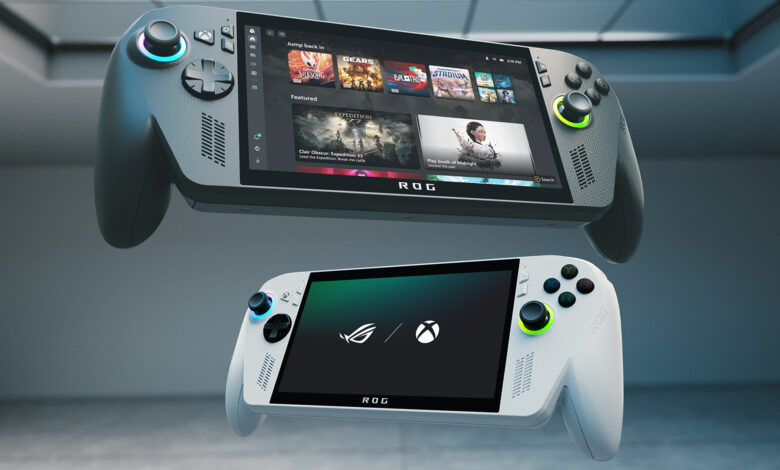
The ROG Xbox Ally is living up to it's initial promises with a fresh update from ASUS adn Microsoft. This latest enhancement introduces Default Game Profiles (Preview), which provide pre-set performance settings for over 40 supported games. Instead of manually adjusting settings like TDP, FPS limits, or power modes, the device automatically applies these profiles when you start a game. This feature is currently being rolled out in preview mode, with more titles expected soon.
- At launch, the profiles support popular games such as Call of Duty: Black Ops 6, Hollow Knight: silksong, Forza Horizon 5, and Halo: The Master Chief Collection.
- The system intelligently assesses whether a game is underperforming or exceeding expectations and adjusts FPS and power usage accordingly.
- You can easily toggle these profiles on or off using the Game profiles widget in Armoury Crate Command Center.
- This preview requires you to have the latest version of Armoury Crate SE, along with updates for the Xbox PC app and Windows 11.
The Importance of Default Game Profiles
Handheld gaming often comes with compromises. High power demands can quickly drain your battery while saving energy may lead to lower performance. With Default Game Profiles, this handheld device takes care of those trade-offs automatically. It makes using the ROG Xbox Ally simpler and more enjoyable by reducing manual adjustments—perfect for gamers who prefer not to fiddle with hardware settings constantly.
- This auto-tuning feature enhances battery life without requiring deep technical knowledge from users.
- The pre-configured profiles ensure that gaming performance remains optimal right from launch.
- This update brings console-like ease into handheld gaming by offering plug-and-play functionality.
- A longer lifespan for your device's battery health results from fewer manual tweaks over time.
Your Gaming Experience Just Got Better!
If you're already an owner of a ROG Xbox Ally—or thinking about getting one—the new Default Game Profiles will significantly enhance your gameplay experience. You’ll likely notice steadier frame rates and improved battery life while playing supported titles without needing to adjust any settings yourself. this means less downtime between sessions so you can enjoy uninterrupted gaming on-the-go!
A key distinction between this approach and Valve’s Steam Deck lies in how each handles game optimization. While steam Deck relies on developers embedding presets within their games, Microsoft’s method focuses on creating tailored profiles based on device performance rather than individual titles alone. This means that even if a developer hasn’t included specific support in their game design, you'll still benefit from optimized playability thanks to these new features!
A Bright Future Ahead for Handheld Gaming
Additionally, Microsoft plans to expand its Handheld Compatibility badges—similar to Steam Deck’s Verified feature—which will help identify more games ready for handheld play soon! When combined with Default Game Profiles functionality, this update could be transformative for gamers seeking seamless experiences right out of the box without hassle or confusion about setup processes!
Your next Steps With the Update
If you own an ROG Xbox Ally already or plan on purchasing one soon—updating your device should be priority number one! Once you've installed both firmware updates along with Armoury Crate SE patches onto your system; expect automatic activation of these exciting new game profile features! Afterward? Dive into some favorite titles & see where smoother gameplay awaits alongside extended battery life compared against previous experiences!
And don't forget! NoveByte might earn a little pocket change when you click on our links helping us keep this delightful journalism rollercoaster free for all! These links don’t sway our editorial judgment so you can trust us If you're feeling generous support us here !