Google Calendar Gets a Boost with New Task Feature
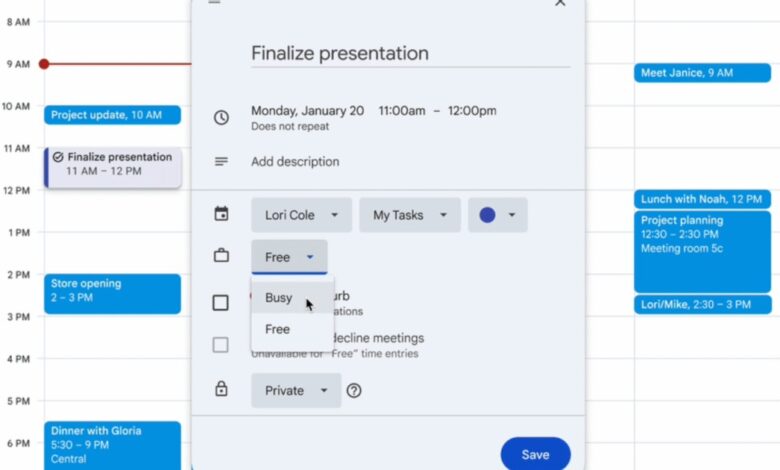
What’s new? Google has rolled out an exciting update to its Calendar app.Users can now allocate specific time slots for tasks using Google Tasks, marking themselves as “busy” during those periods.
To take advantage of this feature, simply click on an empty slot in your Calendar. From ther, select “Task,” enter the task name, set the duration adn description, adjust visibility settings, and choose options like “Do Not Disturb” or auto-decline meeting invites if needed.
This enhancement began appearing in Rapid Release domains on November 6, 2025. For those in Scheduled Release domains, it will be available starting December 1, 2025.
The new functionality is accessible to all Google Workspace users and also individual subscribers and personal account holders.
The Importance of This Update
Why does this matter? this update significantly improves how Tasks work within Google Calendar. Previously, users had to create fake meetings just to block off time for their work; now there’s a straightforward option for time-blocking tasks directly.
This change fills a gap that many users have faced while using the Google Calendar app. Many have relied on makeshift solutions to reserve their time effectively.
For businesses utilizing Google Workspace, this feature allows employees to communicate their essential working hours clearly with colleagues and clients alike.
Moreover, Tasks are evolving beyond simple checklists; they now occupy actual time slots in your calendar. This means you can plan your day more efficiently by integrating tasks into your schedule seamlessly.
A Game Changer for Your Scheduling Needs
Why should you pay attention? If you rely on Google Calendar for organizing meetings and work commitments,this new feature lets you set aside dedicated times for critically important tasks—not just meetings—while informing others of your unavailability during those periods.
This capability enables you to carve out specific blocks of time for focused work while sharing that data with coworkers or clients who may need it.
The best part? Both personal Gmail account holders and Workspace users can benefit from this update. Creative professionals such as freelancers or designers will find it particularly useful when managing their schedules effectively without interruptions from unexpected meetings or calls.
The Future Looks Bright
What’s next on the horizon? Looking ahead, we might see further enhancements from Google that build upon this concept. Potential updates could include features like recurring task scheduling or deeper integration with focus mode tools designed to minimize distractions during critical work hours.
Add-ons developed by third-party tools could also emerge around thes new capabilities—think overlays that provide analytics based on how effectively you're managing your task blocks within the calendar framework!
Additions may even extend into mobile platforms where offline scheduling becomes possible along with smarter suggestions tailored specifically toward optimizing productivity throughout each day!
And don't forget! NoveByte might earn a little pocket change when you click on our links, helping us keep this delightful journalism rollercoaster free for all! These links don’t sway our editorial judgment so you can trust us. If you’re feeling generous support us here.